Lesson 3 / 5 in Product & Development
How to Build a Resume App That Earns 40K Dollars per Month with Zero Lines of Code (17-Minute Build)
TL;DR
A step-by-step walkthrough of building a resume builder app from scratch using the AI no-code tool Base44 and publishing it to the app store -- all without writing a single line of code.
How to Build a Resume App That Earns 40K Dollars per Month with Zero Lines of Code (17-Minute Build)
One-Line Summary
A step-by-step walkthrough of building a resume builder app from scratch using the AI no-code tool Base44 and publishing it to the app store -- all without writing a single line of code.
Key Numbers & Data
| Metric | Figure | Context |
|---|---|---|
| Resume App Monthly Revenue | 40,000 USD/month | Actual monthly revenue of resume builder apps on the App Store |
| Coding Required | 0 lines | Entire app built with AI prompts only, no code written |
| Build Time | About 17 minutes | From prompt input to publish |
| Number of Prompts Used | 5 | Front-end, templates, editor, AI workflow, export -- 5 total prompt stages |
Background: Why This Matters
The no-code app builder market is experiencing explosive growth as of 2026. According to Gartner, the global low-code/no-code market is projected to surpass 30 billion dollars in 2026, and 75% of new apps this year will be built with low-code technology. Even more notable is that 80% of the people using these tools are not from IT departments but regular employees and solo entrepreneurs.
Building an app used to require assembling a development team, months of development time, and tens of thousands of dollars in costs. But AI-powered no-code tools are tearing down all those barriers. A prime example is Base44. Launched in late 2024, this platform surpassed 250,000 users and achieved profitability in just six months, then was acquired by Wix for 80 million dollars in June 2025. The fact that a tool created by a solo founder received that valuation in six months shows just how hot this market is.
Resume builders and similar utility apps are particularly well-suited for solo entrepreneurs because they have consistent demand and simple structures. The resume builder app Rezi achieved annual revenue of 2.4 million dollars (200,000 dollars per month), and with a premium subscription model (9-29 dollars per month), securing just a 5-8% conversion rate makes tens of thousands of dollars in monthly revenue realistic. The key to these apps is not "code complexity" but "user experience completeness."
Key Insights
1. Why Simple Utility Apps Generate 40,000 Dollars per Month
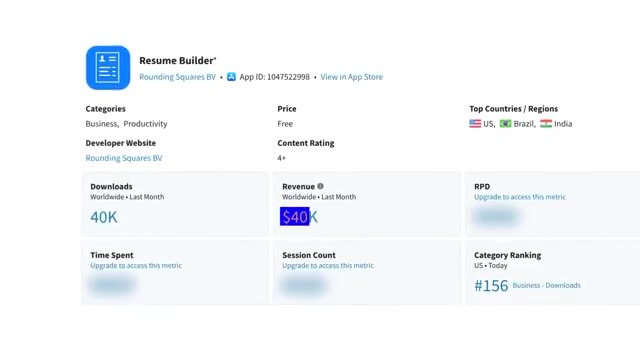
On the App Store, seemingly simple apps are generating surprising revenue. Resume builder apps are a prime example, with some actually earning over 40,000 dollars per month.
Many people think building such apps requires years of coding experience or a large development team, but that is the "old way" now. The no-code revolution is changing everything about app development, and with just one AI tool, you can create an entire app through prompt input alone.
The key is not "complex technology" but "the right tools and approach." Enter your idea as a prompt, and AI builds the entire app -- achieving app-store-publish-ready completeness without any coding or technical skills.
"I typed my idea as a prompt into the AI tool, and the entire app was built. No coding, no technical skills needed. Simple prompts and AI does all the heavy lifting."
How to Apply: Research simple utility apps on the App Store that earn tens of thousands of dollars monthly. Look at app categories with simple structures like resumes, calculators, and timers to discover opportunities.
2. Screens Before Features -- UI-First Strategy Determines App Quality
The most common mistake when building an app is trying to build everything at once. The effective approach is the exact opposite -- attach features later and establish the screen layout first.
When users open a resume builder, they already have a clear goal: build a resume. They are not trying to explore new features or learn a system. They want a clean, professional-looking environment where they can complete their resume without friction. That is why layout matters as much as features. If the structure is confusing or cluttered, users bounce quickly.
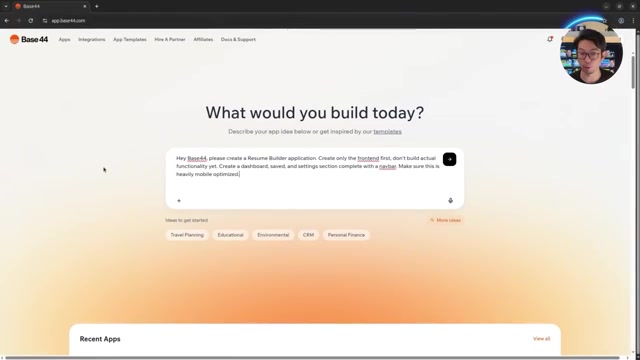
The first prompt is this simple: "Build a resume builder app. Build only the front-end first, don't build actual features yet. Create dashboard, saved, and settings sections with a navigation bar, optimized for mobile." This single prompt immediately generates a dashboard, saved resumes section, and settings page with placeholder content. The key at this stage is toggling between web and mobile views to check that screen transitions work properly.
"Don't try to build everything at once. Establishing the app's visual layout first is the key."
How to Apply: When building an app, do not implement features first. Instead, establish the layout of key screens first. Just build three screens -- dashboard, main feature, and settings.
Tools Mentioned:
- Base44 - AI-powered no-code app builder. Auto-generates web/mobile apps from prompt input
3. Users Want a Starting Point, Not a Blank Screen
When a user opens the app, the first thing they care about is "what will my resume look like?" Most people do not want to start from a blank page. They want a strong starting point that already looks professional.
That is why templates play such an important role in a resume builder. Templates set the tone and eliminate the initial friction. They allow users to focus immediately on content without worrying about design.
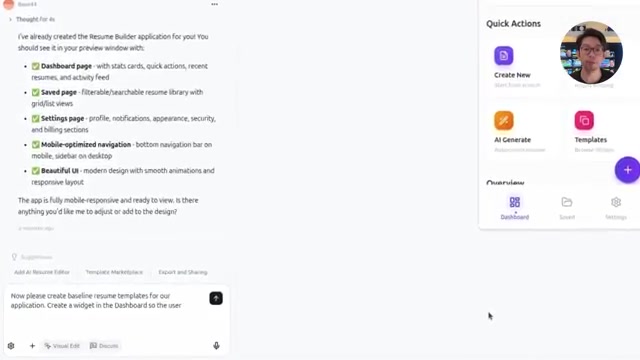
The second prompt is: "Create default resume templates. Build a widget on the dashboard so users can access these templates." This single prompt adds a new template widget to the dashboard, with clear previews for each template so users can quickly compare styles and choose. Making it feel clean and intentionally designed is the key.
"Templates set the tone and immediately eliminate the initial friction."
How to Apply: Add templates or preset features to your app to lower the entry barrier for users. Even just 3-5 default templates can dramatically improve the user experience.
4. Editor Familiarity Determines Whether Your App Succeeds or Fails
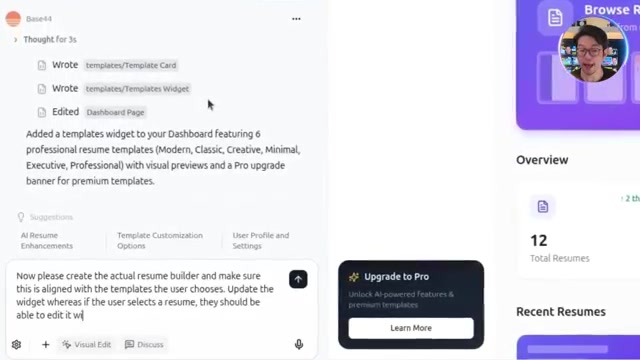
Templates provide a starting point, but the real value of a resume app is determined after the template is selected. The editing screen is where users actually spend their time -- editing, formatting, and refining their resume to match their experience.
If this part feels clunky or restrictive, no matter how good the templates are, the entire app falls apart. So the next focus point is the resume builder itself. When a user selects a template, the app needs to provide a full editor that is familiar, flexible, and easy to use.
The third prompt: "Build the resume builder and connect it to the user's selected template. Update the widget so selecting a resume opens it for detail editing. Optimize for mobile, and make the editor similar to Word." The result is a professional editor with text alignment, font size, and various formatting tools arranged at the top of the screen. Providing a Word-like interface familiar to users is the core strategy.
"If the editing part feels clunky or restrictive, the entire app falls apart."
How to Apply: Design your app's core editing features by referencing interfaces users are already familiar with. Benchmarking the UX of existing tools like Word and Google Docs reduces the learning curve.
5. The Real Problem Is Not Formatting but "What to Write" -- Solving It with AI
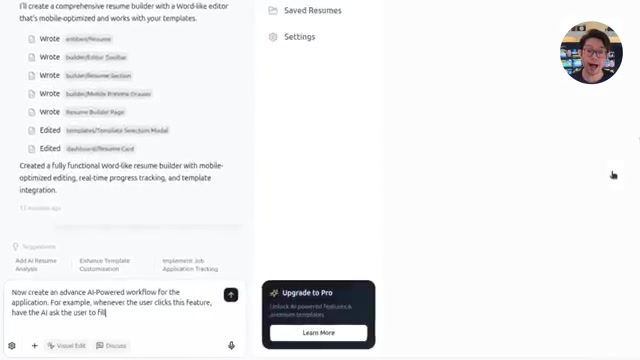
The part most people truly struggle with when writing a resume is not formatting. It is not knowing what to write. The question "What should I write about myself?" is the biggest barrier. AI-powered auto-generation solves this problem.
Instead of users starting from a blank field, they briefly describe themselves, make a few selections, and the system handles the rest. This feature transforms the app from a simple "tool" into an "assistant."
The fourth prompt: "Build an AI-powered advanced workflow. When this feature is clicked, AI guides the user to enter information and select a template. Then AI automatically creates a resume based on user information and shows a preview modal." With minimal information, AI generates a complete resume -- not a text block, but a properly structured resume matching the selected template and formatting rules. More detailed input yields more accurate results, but even minimal information produces immediately usable output.
"Most people don't struggle with formatting. Not knowing what to write is the real problem."
"This feature transforms the app from a simple tool into an assistant."
How to Apply: Add AI auto-generation to your app's core feature. Minimizing user input while producing high-quality output is the differentiator for apps in 2026.
6. Without a Download Button, It Is Not an App -- The Importance of Export
If a user has invested time in a resume builder -- selecting a template, filling in information, refining content -- their final expectation is simple: "I want to download my resume and use it anywhere." Without this final step, the app is not complete.
Since resumes are used in various situations like online applications, emailing recruiters, and uploading to job portals, the export function needs to work smoothly across all platforms and scenarios.
The fifth and final prompt: "Build an export feature. When users export their resume, they should be able to download it in various file formats." Selecting PDF exports the resume instantly and download starts automatically. Completing this step finishes the full end-to-end core experience of creation, editing, AI generation, and export.
"If the user can't take their resume with them, the resume builder isn't complete."
How to Apply: Implement export functionality that lets users take their created content outside the app. Supporting formats that match real-world usage environments, such as PDF and DOCX, is essential.
7. From Build to Publish -- How to Release Your App to the World in a Few Clicks
With all features built, you need to test the app end-to-end as a real user would. Starting from the dashboard, check that navigation works consistently through saved resumes and settings.
Create a new resume from a template, enter information, save, then export and download to confirm the entire flow operates without friction. Repeat the same process with the AI resume builder to verify that both manual and AI creation provide the same quality experience.
Once all tests pass, click the publish button in Base44. A live URL is automatically generated. Since login is required by default, turning off the login requirement in settings makes it a publicly accessible app. Copy the public link and you are done. As a web app, it is already complete -- and from here, tools like Despia can convert this web app into an actual app store app.
"What was needed here was not a large team, custom code, or a complex setup. What you have now is not a demo -- it's an already-working web app."
How to Apply: After building your app, always run an end-to-end test using real user scenarios. Then use Base44's one-click publish to go live on the web immediately.
Tools Mentioned:
- Despia - Service that converts web apps into native app store apps
Action Checklist
Today:
- Sign up for a free Base44 account and explore the interface
- Download five resume builder apps from the App Store and analyze their UI/UX
- Write the first prompt (front-end only) for the app you want to build
This Week:
- Build a simple utility app from start to finish using Base44
- Design three screens first using the UI-first strategy (dashboard, main feature, settings)
- Plan how to integrate AI auto-generation into your app
Long-Term:
- Publish your completed app via Base44 and collect real user feedback
- Register on the app store using Despia and develop a monetization strategy
- Expand your utility app portfolio to 3-5 apps to diversify revenue sources
References
Related Tools
| Tool | Purpose | Price | Link |
|---|---|---|---|
| Base44 | AI no-code app builder (auto-generates full-stack apps from natural language input) | Free / Starter 16 USD/month / Builder 40 USD/month / Pro 80 USD/month | Go |
| Despia | Converts web apps to native app store apps (25+ native API support) | 249 USD one-time (1 app, 1 store) | Go |
Related Resources
- Base44 Official Pricing Page - Latest plans and feature comparison
- How Base44 Got Acquired in 500 Days - The story from Base44's founding to Wix acquisition
- 6-month-old Base44 sells to Wix for 80M USD (TechCrunch) - Background on the solo startup's 80 million dollar acquisition
- Despia - Turn Web Apps into Mobile Apps - Service for listing web apps on App Store/Google Play
- No-Code/Low-Code Market Statistics 2026 - 120+ statistics and trend data
Fact-Check Sources
- Resume builder apps earn over 40,000 dollars per month in revenue → https://boringcashcow.com/view/resume-builder-achieves-24m-annual-revenue
- Base44 is one of the best AI app builders → https://techcrunch.com/2025/06/18/6-month-old-solo-owned-vibe-coder-base44-sells-to-wix-for-80m-cash/
Questions to Consider
Among the repetitive tasks in my daily life, which one could I turn into an app that others would pay to use?
In an era where user experience design ability matters more than coding skills, where do my strengths lie?
If AI builds 80% of the app, what differentiation can I create in the remaining 20%?
Key Takeaways
- 1Sign up for a free Base44 account and explore the interface
- 2Download five resume builder apps from the App Store and analyze their UI/UX
- 3Write the first prompt (front-end only) for the app you want to build
- 4Build a simple utility app from start to finish using Base44
- 5Design three screens first using the UI-first strategy (dashboard, main feature, settings)
- 6Plan how to integrate AI auto-generation into your app
- 7Publish your completed app via Base44 and collect real user feedback
- 8Register on the app store using Despia and develop a monetization strategy
- 9Expand your utility app portfolio to 3-5 apps to diversify revenue sources
Want to read this later?
Save this insight to access it anytime
Original Video
코딩 0줄로 월 4만 달러 버는 이력서 앱 만드는 법 (17분 완성)