Lesson 1 / 2 in Data & Analytics
Apple Search Ads: From 40 USD/Day Budget Setup to Keyword Optimization — A Practical Guide for Indie Developers
TL;DR
A step-by-step practical guide for indie developers setting up their first Apple Search Ads Advanced campaign, covering 40 USD/day budget setup, CPT bidding strategy, keyword selection, and audience targeting.
Apple Search Ads: From 40 USD/Day Budget Setup to Keyword Optimization — A Practical Guide for Indie Developers
One-Line Summary
A step-by-step practical guide for indie developers setting up their first Apple Search Ads Advanced campaign, covering 40 USD/day budget setup, CPT bidding strategy, keyword selection, and audience targeting.
Key Numbers & Data
| Metric | Value | Context |
|---|---|---|
| Daily Ad Budget | 40 USD/day (~1,000 USD/month) | Appropriate starting ASA budget for indie developers |
| Actual CPT (Cost Per Tap) | 2-5 USD | Much higher than Apple's suggested 0.70 USD |
| CPT Range by Keyword | 0.99-3.61 USD | Cost per tap variation across keywords confirmed in experimental campaigns |
| Basic Campaign Promo Credit | 100 USD | Free credit Apple provides when starting a Basic campaign |
| YouTube Subscribers Keyword CPA | 2.40 USD | Cost per install for the most efficient keyword discovered |
Background: Why This Matters
Apple Search Ads (ASA) is the only official advertising platform that places apps at the top of App Store search results. For indie developers, ASA is a critical channel for quickly acquiring downloads when organic search rankings are hard to improve, but detailed Advanced campaign configuration is essential to maximize results on a limited budget.
Key Person Background: Sean Allen is a self-taught iOS developer who started coding at age 32. After an iOS bootcamp, he landed his first iOS developer job in just 7 months. With approximately 165,000 YouTube subscribers, he's the developer of Creator View (an analytics app for YouTubers) and shares indie app growth strategies and real revenue data through his Build, Ship, Profit podcast.
Relevant Market Data:
- Apple global ad revenue 103.4 billion USD (2025 estimate)
- Global average CPT 2.50 USD (57% increase from 1.59 USD in 2023)
- US average CPT approximately 1.91 USD
- Global average conversion rate 67.2%
Key Insights
1. Why Choose Advanced and How to Use the Basic 100 USD Credit
When you first access Apple Search Ads, you must choose between Basic and Advanced. Basic simply hands your budget to Apple and lets them handle everything — you can't see which keywords you're appearing for or where ads are showing. Advanced lets you directly decide how much to spend on which keywords and track performance per keyword in real time on the dashboard.
One tip: choosing Basic gets you a 100 USD promo credit from Apple. Since it's free money, starting with Basic to see initial results before moving to Advanced isn't a bad idea.
"For most indie devs money is tight and we want to be very efficient and calculated with our money."
"Advanced isn't really all that advanced."
How to Apply: Create an ASA account, use the 100 USD free credit with a Basic campaign first, then set up an Advanced campaign.
2. Two Things You Must Prepare Before Spending Ad Money
Funneling users to your App Store page through ads is ultimately about making a 'first impression.' If your App Store marketing page is poor, conversion rates will drop no matter how well you rank for keywords. Check whether your screenshots are attractive and your app description communicates core value.
Second, the first-run experience — the onboarding flow — matters too. If users acquired through ad spend immediately churn, that money is simply wasted.
"Make sure your app store marketing page and App Store screenshots are in a good spot."
How to Apply: Before running ads, review and improve at least 3 App Store screenshots and the onboarding flow.
3. Why Search Results Is the Best Choice for Indie Developers
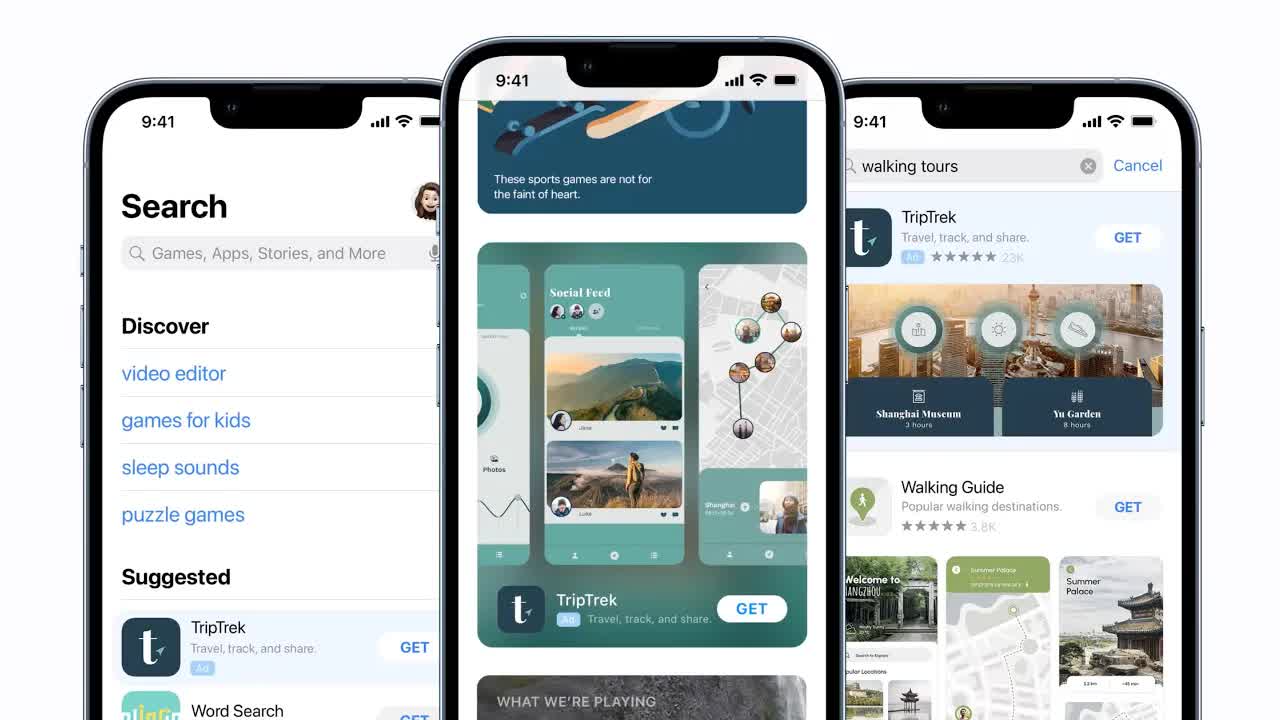
When creating an Advanced campaign, Apple offers 4 placements: Today Tab, Search Tab, Product Pages, and Search Results. For niche app developers, concentrating most of your budget on Search Results is the right answer. Since you appear at the top of results when users search specific keywords, conversion rates are highest.
"The bread and butter, what we're going to talk about today, is by far these search results."
How to Apply: Start your first campaign with Search Results placement. Add Product Pages experimentally when budget allows.
4. Setting a 40 USD/Day Budget and Running Experiment-Based Campaigns
The key to daily budget setting is thinking in monthly terms. If you can spend 1,000 USD per month, divide by 30 to set daily budget at 33-40 USD. Always set an end date on campaigns — ASA is an 'experiment.'
Two CPT bidding approaches:
- Fast method: Set Max CPT high, like 15 USD. You won't actually pay 15 USD (auction structure means you pay market price), but you collect data quickly.
- Cheap method: Start at Apple's suggested price (0.70 USD) and gradually increase.
Apple's suggested CPT is almost never accurate. In practice, you often need to bid 3-7x the suggested price before impressions start.
"Suggested has never been accurate for me like I've had to pay like two three four five bucks per tap."
How to Apply: Set up your first experiment campaign for 30 days with CPT at 10-15 USD to quickly understand market pricing.
5. Exact Match vs Broad Match and Negative Keyword Strategy
Exact Match shows your ad only when users search that exact keyword. Broad Match includes similar keywords. Efficiency-focused indie developers should use Exact Match as default, while running a separate experiment campaign with Broad Match to discover new keywords.
Negative keywords let you pre-block keywords you don't want to appear for.
"Some of your ad budget has to be towards experiments because there's no way you're going to find the good stuff unless you run a bunch of experiments."
How to Apply: Run a main campaign with 5-10 core keywords on Exact Match + a separate experiment campaign with Broad Match/Search Match ON simultaneously.
6. Audience Segmentation and Keyword-Specific Screenshot Strategy
The default is 'All Users,' but you can fine-tune by device, customer type, and demographics/location. Custom Product Pages are the most powerful feature — you can show tailored screenshots for specific keyword campaigns.
"If you're gonna do a targeted campaign you can really tweak your screenshots to be really focused on the keyword you're going for."
How to Apply: Create custom product pages in App Store Connect for your 1-2 most important keywords and link them to those keyword campaigns.
7. Key Data to Collect from Your First Experiment and Optimization Direction
The biggest goal of your first ASA campaign isn't a 'perfect campaign' — it's 'data collection.' Through experimentation, the 'YouTube subscribers' keyword was found to be most efficient at 2.40 USD CPA, enabling an optimized campaign to be built around it.
This is the core ASA loop: experiment campaign → data analysis → optimized campaign → experiment again.
"You can't optimize what you don't know so I would recommend your first search ads campaign be that experiment."
How to Apply: After your first experiment campaign ends, organize CPT/CPA by keyword in a spreadsheet, then create a focused campaign with the top 3-5 keywords by lowest CPA.
Action Checklist
Today:
- Go to searchads.apple.com and create an account
- Use the 100 USD free credit with a Basic campaign
- Review and improve App Store screenshots and description
This Week:
- Create first Advanced campaign (Search Results, 30-day period, 30-40 USD/day)
- Set 10-20 core keywords on Exact Match
- Set Max CPT at 10-15 USD to understand market pricing
- Configure negative keywords appropriate for your app
Long-term:
- Analyze keyword-by-keyword CPT/CPA data after 30 days
- Create focused campaign with top 3-5 efficient keywords
- Build custom product pages for key keywords
- Establish routine of separating experiment and optimization campaigns
References
Related Tools
| Tool | Use Case | Pricing | Link |
|---|---|---|---|
| Apple Ads | Official search ad platform within App Store | CPT model: category avg 0.92-12.60 USD | Go |
| App Store Connect | Custom product page creation and management | Included in Apple Developer Program (99 USD/year) | Go |
| SplitMetrics Acquire | Official Apple Ads partner. Campaign automation, A/B testing | Free Starter plan available | Go |
| AppTweak | ASO + ASA integrated tool. Keyword discovery, CPP analysis | Free trial available | Go |
Related Resources
- The Ultimate Guide to Apple Search Ads in 2026 (Article)
- Apple Ads Guide: From Beginner to Expert (Article)
- Apple Ads Search Results Benchmarks Report 2025 (Article)
Questions to Consider
Can you immediately list 10 keywords that your app's core target audience would search for?
Can someone seeing your App Store page for the first time understand your app's core value within 3 seconds?
What percentage of your ad budget can you allocate to 'experiments'? Can you view it as an investment in data collection?
Key Takeaways
- 1Go to searchads.apple.com and create an account
- 2Use the 100 USD free credit with a Basic campaign
- 3Review and improve App Store screenshots and description
- 4Create first Advanced campaign (Search Results, 30-day period, 30-40 USD/day)
- 5Set 10-20 core keywords on Exact Match
- 6Set Max CPT at 10-15 USD to understand market pricing
- 7Configure negative keywords appropriate for your app
- 8Analyze keyword-by-keyword CPT/CPA data after 30 days
- 9Create focused campaign with top 3-5 efficient keywords
- 10Build custom product pages for key keywords
- 11Establish routine of separating experiment and optimization campaigns
Want to read this later?
Save this insight to access it anytime